ဖူးစာရွင္ေလး Android application

သတင္းေတြ ၊ နည္းပညာေတြ ၊ ကာတြန္း ၊ ျမန္မာအနုပညာရွင္မ်ားရဲ႕လွဳပ္ရွားမွဴေတြ model ဓါတ္ပံုမ်ား အားကစား သတင္းမ်ား တျခား ဗဟုသုတရေစမယ့္

မိစႏၵီနဲ့ အင္တာဗ်ဴး

Go to Blogger edit html and find these sentences.Now replace these sentences with your own descriptions.This theme is Bloggerized by Lasantha Bandara - Premiumbloggertemplates.com.

Blog spot မွာ Online Web Mp3 Player ထည္႕မယ္

Go to Blogger edit html and find these sentences.Now replace these sentences with your own descriptions.This theme is Bloggerized by Lasantha Bandara - Premiumbloggertemplates.com.

This is default featured slide 4 title

Go to Blogger edit html and find these sentences.Now replace these sentences with your own descriptions.This theme is Bloggerized by Lasantha Bandara - Premiumbloggertemplates.com.

This is default featured slide 5 title

Go to Blogger edit html and find these sentences.Now replace these sentences with your own descriptions.This theme is Bloggerized by Lasantha Bandara - Premiumbloggertemplates.com.

.

Sunday, February 17, 2013

Photoshop CS6 Extended Portable (multilang)

Photoshop CS6 Extended Portable (multilang)


Adobe® Photoshop® CS6 Extended software delivers even more imaging magic, new creative options, and the Adobe Mercury Graphics Engine for blazingly fast performance. Retouch with greater precision, and intuitively create 3D graphics, 2D designs, and movies using new and reimagined tools and workflows.

New Features
Enhance your creativity and boost your productivity. Adobe® Photoshop® CS6 Extended software delivers blazingly fast performance with the new Adobe Mercury Graphics Engine, groundbreaking new Content-Aware tools, simplified 3D artwork creation, reengineered design tools, and more.

Content-Aware Patch

Patch images with greater control using Content-Aware Patch, which allows you to choose the area that Content-Aware will use to create your patch.


Mercury Graphics Engine

Mercury Graphics Engine


See near-instant results when you're editing images with key tools such as Liquify and Puppet Warp, creating 3D artwork, and working with matte paintings and other large files.
3D performance boost

3D performance boost

Experience enhanced performance throughout your 3D workflows. View shadows and reflections in all editing modes, quickly render final work in Adobe RayTrace mode thanks to the Mercury Graphics Engine, and much more.
3D controls at your fingertips

3D controls at your fingertips

Use a vastly simplified user interface to intuitively create and animate 3D artwork. Use in-context and on-canvas controls to manipulate cages for 3D extrusions, change the orientation of scenes and objects, edit lights, and more.
New and reengineered design tools

New and reengineered design tools

Create superior designs faster. Get consistent formatting with type styles, use vector layers to apply strokes and add gradients to vector objects, easily create custom strokes and dashed lines, quickly search layers, and more.
New Blur Gallery

New Blur Gallery

Quickly create photographic blur effects using a simple new interface with on-image controls. Create tilt-shift effects, blur everything and then sharpen one focal point, or vary the blurriness between multiple focal points. The Mercury Graphics Engine delivers immediate results.
All-new Crop tool

All-new Crop tool

Crop images faster and with greater precision using the all-new, nondestructive Crop tool. Manipulate your images on canvas, and take advantage of the Mercury Graphics Engine to see your adjustments happen live.
Modern user interface

Modern user interface

Work with a fresh, elegant interface featuring dark background options that make your images pop, and benefit from hundreds of design touches that create a smoother, more consistent editing experience.
New reflections and draggable shadows

New reflections and draggable shadows

Quickly achieve 3D realism by adding and enhancing shadows and reflections on your ground plane. Drag a shadow to reposition the light source, and easily edit ground reflections, shadows, and other effects.
Intuitive video creation

Intuitive video creation

Bring Photoshop image editing power to your videos. Easily enhance any clip using the full range of familiar Photoshop editing tools, and combine clips and stills with transitions, audio, and effects such as pan and zoom.
Background Save

Background Save

Keep on working even while saving the largest of Photoshop files in the background — a performance improvement that can help your productivity soar.
Auto-recovery

Auto-recovery

Let the auto-recovery option work behind the scenes to save your edits without interrupting your progress. A copy of your work is saved every 10 minutes and recovered in the event of an unexpected shutdown.
Easy alignment and distribution of 3D objects

Easy alignment and distribution of 3D objects

Create rich 3D scenes in less time now that you can automatically align 3D objects to the vanishing point in your image and manipulate a group of 3D objects at one time using a new multiselect option.
Content-Aware Move

Content-Aware Move

Move or extend a selected object to another area of your image, and then watch as Content-Aware Move magically recomposes and blends the object for a stunning visual result.

In this portable version there are included a lot of languages! List:
English
Italian
German
Dutch
Spanish
French
Brazilian Portuguese
Danish
Finnish
Norwegian
Swedish

Also added some additional plugins...
Ascii Art, Box Fitting, DiffGlow, EdgesXF, Fur 2 (Mehdi), Half Tone, Illum FixV17b9d, Luce, Luce2, Mosaic Toolkit, Retrodots, Scanlines, SortingTiles

Also included Adobe Bridge CS6, in another exe file!


 Password: thop 
_____________________________
If you are a person that loves Adobe and wants to report this to DMCA, just know that people who download Acrobat from here are normal people, people who definitely wouldn't buy the whole huge installed Ps for so many money as it costs if it wasn't available here - they would search for another photo editing program, maybe opensource but that surely it's worse than this. 
So, let more people enjoy this wonderful program, you'll do a favor to a lot of people, really a lot trust me!
More users and less haters for a company is better, isn't it? 
Thank you. 
 P.S. Y U NO ALSO READ THE DISCLAIMER FIRST? ;) 
_____________________________

Photoshop CS6 Extended Portable (multilang)

Photoshop CS6 Extended Portable (multilang)


Adobe® Photoshop® CS6 Extended software delivers even more imaging magic, new creative options, and the Adobe Mercury Graphics Engine for blazingly fast performance. Retouch with greater precision, and intuitively create 3D graphics, 2D designs, and movies using new and reimagined tools and workflows.

New Features
Enhance your creativity and boost your productivity. Adobe® Photoshop® CS6 Extended software delivers blazingly fast performance with the new Adobe Mercury Graphics Engine, groundbreaking new Content-Aware tools, simplified 3D artwork creation, reengineered design tools, and more.

Content-Aware Patch

Patch images with greater control using Content-Aware Patch, which allows you to choose the area that Content-Aware will use to create your patch.


Mercury Graphics Engine

Mercury Graphics Engine


See near-instant results when you're editing images with key tools such as Liquify and Puppet Warp, creating 3D artwork, and working with matte paintings and other large files.
3D performance boost

3D performance boost

Experience enhanced performance throughout your 3D workflows. View shadows and reflections in all editing modes, quickly render final work in Adobe RayTrace mode thanks to the Mercury Graphics Engine, and much more.
3D controls at your fingertips

3D controls at your fingertips

Use a vastly simplified user interface to intuitively create and animate 3D artwork. Use in-context and on-canvas controls to manipulate cages for 3D extrusions, change the orientation of scenes and objects, edit lights, and more.
New and reengineered design tools

New and reengineered design tools

Create superior designs faster. Get consistent formatting with type styles, use vector layers to apply strokes and add gradients to vector objects, easily create custom strokes and dashed lines, quickly search layers, and more.
New Blur Gallery

New Blur Gallery

Quickly create photographic blur effects using a simple new interface with on-image controls. Create tilt-shift effects, blur everything and then sharpen one focal point, or vary the blurriness between multiple focal points. The Mercury Graphics Engine delivers immediate results.
All-new Crop tool

All-new Crop tool

Crop images faster and with greater precision using the all-new, nondestructive Crop tool. Manipulate your images on canvas, and take advantage of the Mercury Graphics Engine to see your adjustments happen live.
Modern user interface

Modern user interface

Work with a fresh, elegant interface featuring dark background options that make your images pop, and benefit from hundreds of design touches that create a smoother, more consistent editing experience.
New reflections and draggable shadows

New reflections and draggable shadows

Quickly achieve 3D realism by adding and enhancing shadows and reflections on your ground plane. Drag a shadow to reposition the light source, and easily edit ground reflections, shadows, and other effects.
Intuitive video creation

Intuitive video creation

Bring Photoshop image editing power to your videos. Easily enhance any clip using the full range of familiar Photoshop editing tools, and combine clips and stills with transitions, audio, and effects such as pan and zoom.
Background Save

Background Save

Keep on working even while saving the largest of Photoshop files in the background — a performance improvement that can help your productivity soar.
Auto-recovery

Auto-recovery

Let the auto-recovery option work behind the scenes to save your edits without interrupting your progress. A copy of your work is saved every 10 minutes and recovered in the event of an unexpected shutdown.
Easy alignment and distribution of 3D objects

Easy alignment and distribution of 3D objects

Create rich 3D scenes in less time now that you can automatically align 3D objects to the vanishing point in your image and manipulate a group of 3D objects at one time using a new multiselect option.
Content-Aware Move

Content-Aware Move

Move or extend a selected object to another area of your image, and then watch as Content-Aware Move magically recomposes and blends the object for a stunning visual result.

In this portable version there are included a lot of languages! List:
English
Italian
German
Dutch
Spanish
French
Brazilian Portuguese
Danish
Finnish
Norwegian
Swedish

Also added some additional plugins...
Ascii Art, Box Fitting, DiffGlow, EdgesXF, Fur 2 (Mehdi), Half Tone, Illum FixV17b9d, Luce, Luce2, Mosaic Toolkit, Retrodots, Scanlines, SortingTiles

Also included Adobe Bridge CS6, in another exe file!


 Password: thop 
_____________________________
If you are a person that loves Adobe and wants to report this to DMCA, just know that people who download Acrobat from here are normal people, people who definitely wouldn't buy the whole huge installed Ps for so many money as it costs if it wasn't available here - they would search for another photo editing program, maybe opensource but that surely it's worse than this. 
So, let more people enjoy this wonderful program, you'll do a favor to a lot of people, really a lot trust me!
More users and less haters for a company is better, isn't it? 
Thank you. 
 P.S. Y U NO ALSO READ THE DISCLAIMER FIRST? ;) 
_____________________________
Adobe InDesign CS5.5 Portable

Adobe InDesign CS5.5 Portable

Adobe® InDesign® CS5.5 software, the ultimate tool for designing professional page layouts, now helps you build engaging publications for tablet devices by integrating with Adobe Digital Publishing Suite. Create eBooks with embedded audio and video, improved typography, and images that resize automatically. More efficiently create accessible PDF documents.

View all features»

Download

Sothink Logo Maker Pro 4.0 Portable

Sothink Logo Maker Pro 4.0 Portable

Sothink Logo Maker Pro

Creative Logo Design Software That Works

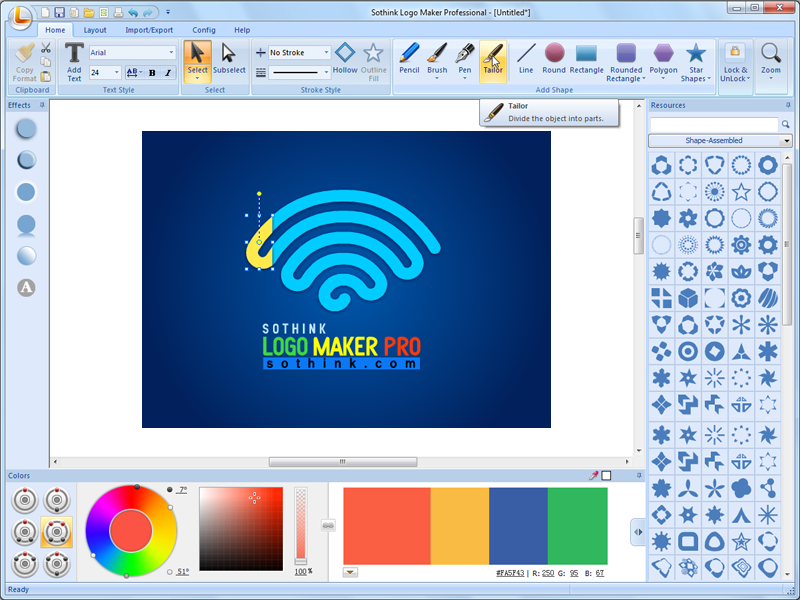
All-round graphic and logo design software, helps you create awesome logos and vector artworks like professionals. Benefiting from smart drawing pens, color schemes, rich effects and build-in symbols, it becomes fairly easy and comfortable to design logos for Web and print. Save you more time and energy than other illustrator and drawing tools.


Paint Logos through Fast Workflow

The business logo design software contains efficient panels and interface. You can find target tool quickly and apply them for your own logo design easily.

Make Logos as Inspired and Original

The logo maker offers handy drawing pen and pencil that help you create logo design from blank canvas directly. Design your logo distinctive and original.

Design Logos with Quick Tools and Effects

Logo creator offers formatting painter that enables you to copy one logo style to another in clicks. You can deal with complex layer alignment with only clicks as well.

Pick Colors under Expert Color Theories

The logo design program will guide you to become a color-matching master. Powerful color wheel gives out thousands of color schemes for logo. Choose colors like experts.

Select from Rich Templates and Symbols

We have embedded abundant of logo templates, logo symbols and special effects into logo designer software. They will give you substantial graphic logo design inspiration.


Master Color Schemes
Preset professional color schemes for any DIY design. You determine dominant color and pattern in Color Wheel, we list all combinations of four colors for choose. Save you time from selecting colors for every logo elements and help you become a color master in minutes.

Plentiful Logo Effects
Rich effect for logo in Effect Panel. Mouse over effect icon and get instant preview then one click to apply. Want to make splash text in logo? Unique feature of converting text into shape makes it alive and enable you to combine scattered letters of text as any way you like.

Smart User Experience
The logo design maker offers friendly user interface and enables you to smoothly create logo. You can easily duplicate any element in clicks with smart formatting painter. The strong Layout panel helps you to edit logo in a quick and professional way.

Expert Drawing Tools
You can draw logo element freely using Pencil and Pen tools. Express your logo design by painting on canvas directly and get WYSIWYG output in this company logo design maker. DIY drawing from blank canvas makes your logo distinctive and impressive.

Mix &Match Skills
Exclusive hollow and split tool adds to more diversity of logo design. You can determine logo from monogram logo, rainbow text to children doodle. You're free to mix and match tools and effects. Choose what works best for your brand and business.

Free Logo Resource
Abundant logo templates and resources are prepared for you. Resources are classified in categories and can be searchable by inputting keywords. Save you time from previewing one by one. You can also import your own resource into logo design maker.


Download - mirror